
# Clinical Trials
The Clinical Trials table in SEQ Platform provides an up-to-date overview of ongoing interventional studies that are relevant to the molecular findings detected in the sample. It automatically links identified biomarkers (e.g., KRAS mutant, KRAS G12D) to active clinical trials, helping clinicians and researchers identify potential research or treatment opportunities for the patient.
All relevant trials are displayed in an interactive, searchable list that can be sorted by criteria such as NCT Number or Trial Phase.
Each entry represents a clinical trial and a molecular profile (e.g., KRAS exon2, TP53 mutant) and summarizes key eligibility and study details.
Each clinical trial entry provides structured details to support quick review and navigation:
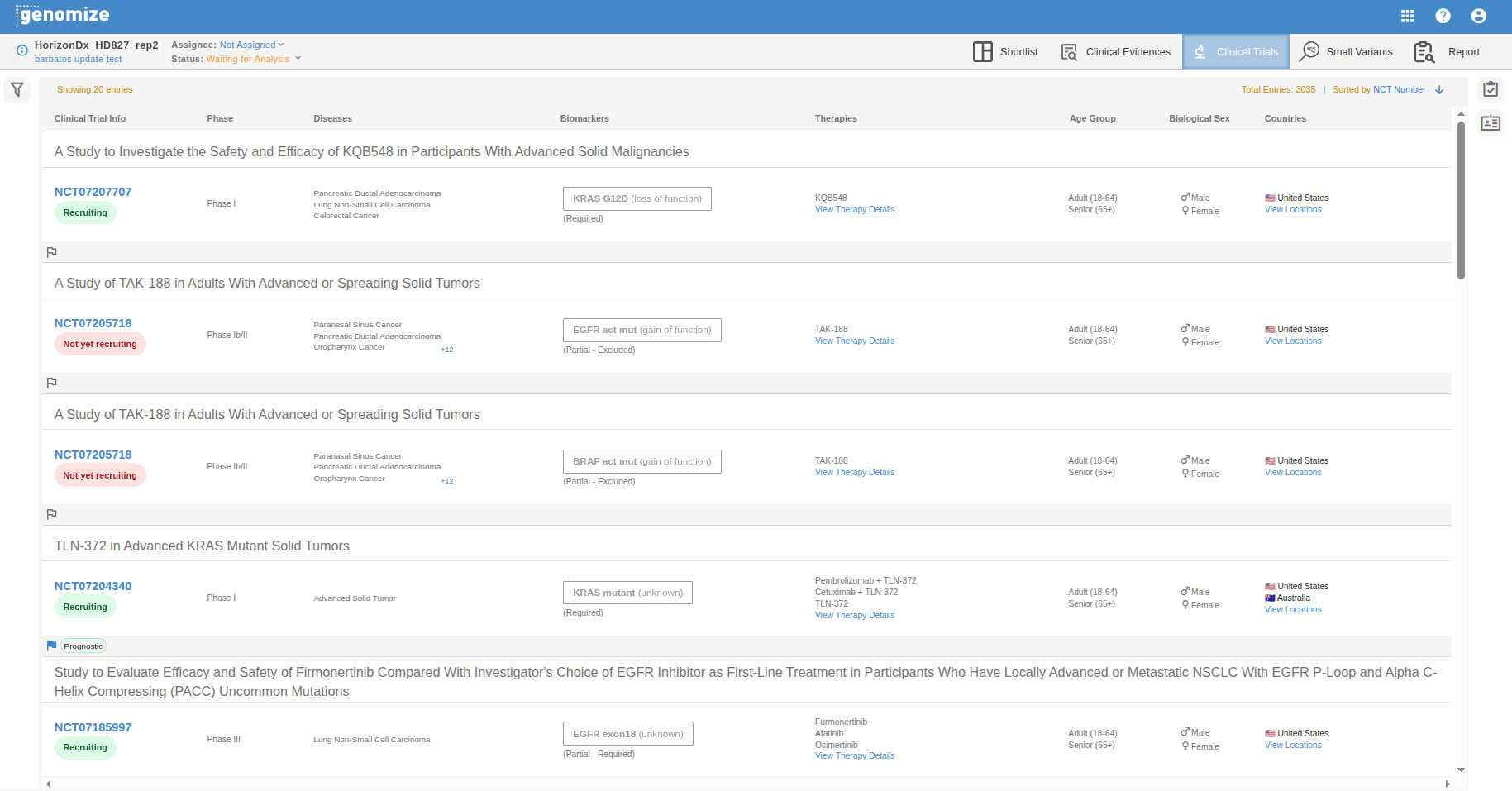
Study Title: The official title of the trial (e.g., A Study to Find a Suitable Dose of ASP5834 in Adults With Solid Tumors).
Trial ID: The official trial identifier (e.g., NCT07094204), linked directly to the external registry (clinicaltrials.gov).
Molecular Profile: The biomarker(s) or gene alterations required for eligibility (e.g., KRAS mutant, KRAS G12D).
Phase: The current clinical phase of the study (e.g., Phase I, Phase I/II, Phase III).
Recruitment Status: The enrollment status of the trial (e.g., Recruiting, Not Yet Recruiting, Completed).
Cancer Types: The specific cancer types or conditions targeted by the study (e.g., Advanced Solid Tumor, Pancreatic Ductal Adenocarcinoma).
Therapies: The therapeutic agents, drugs, or interventions under investigation (e.g., ASP5834 + Panitumumab).
Age Group: The eligible age range for participation (e.g., Adult, Child, Older Adult).
Sex: The eligible biological sex for enrollment (e.g., Male, Female, Both).
Countries: Displays countries representing the locations where the trial is actively recruiting.
Clicking the trial id opens the external clinicaltrial.gov site detailed view with the full trial description, inclusion/exclusion criteria, and direct access to the registry source.
# Filtering
The Filtering panel allows users to refine the list of displayed trials based on multiple parameters:
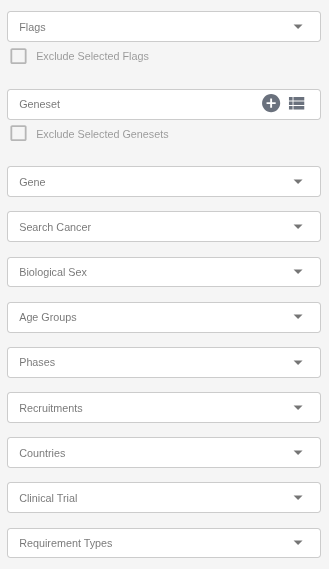
Flags: Filter trials using user-defined flags (e.g., Include in Shortlist).
Geneset: Create your own geneset using the plus icon in this field and apply it as a filter. You can create multiple genesets as needed. System-defined genesets are also available and are updated weekly or upon each new release — for example, the ACMG’s list of recommended genes for incidental findings.
Gene: Search for genes using the autocomplete feature.
Cancer: Search for cancer types using the autocomplete feature.
Sex: Restrict results to trials recruiting participants of a specific sex.
Age Groups: Filter by eligible age range (e.g., Adult, Child, Older Adult).
Phases: Select trials based on their clinical phase (e.g., Phase I, Phase II, Phase III).
Recruitment Status: Show trials according to their enrollment stage (e.g., Recruiting, Not Yet Recruiting, Completed).
Countries: Select one or more countries to find trials in specific geographic locations.
Clinical Trial: Search directly by NCT ID
Requirement Types: Filter trials based on the molecular profile requirement type (e.g., Required, Partially Required).